Integrating Quirky into Your Creative Workflow
In the landscape of digital design, selecting the right typography is often treated as a final polish rather than a foundational element. However, for professionals and creators who understand that visual hierarchy drives user engagement, the choice of font dictates the tone before a single word is read. This is where Quirky enters the conversation. It is not merely a decorative typeface; it is a strategic asset designed to inject personality into thin, high-contrast displays. When you are working on projects that require an "out of this world" aesthetic, integrating Quirky into your workflow requires more than just clicking a button in your software—it demands a thoughtful approach to how the font interacts with your content, your audience, and your broader production pipeline.
Defining the Role of Quirky in Visual Communication
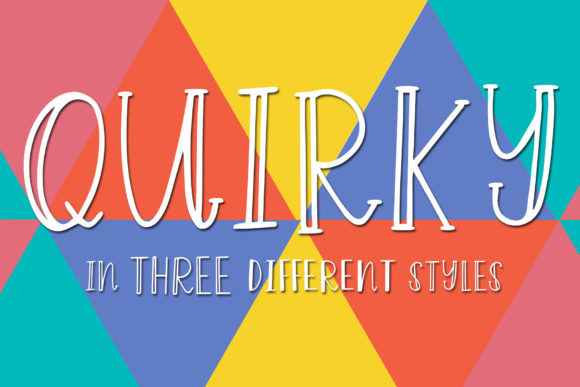
To use Quirky effectively, one must first understand its specific niche within the typographic spectrum. As a unique and thin display font, it possesses characteristics that make it unsuitable for body copy but exceptional for headlines, logos, and key messaging points. The thin strokes and distinctive shapes create an airy, modern feel that stands out against heavier, more utilitarian fonts. This contrast is the core of its utility. In a typical design process, you might be balancing readability with brand identity. Quirky serves as the bridge between these two goals when the project calls for a sense of whimsy without sacrificing elegance.
Consider the scenario of a marketing team launching a new product line aimed at a younger, trend-conscious demographic. The campaign needs to feel fresh and innovative. A standard sans-serif might communicate efficiency, but it lacks character. By introducing Quirky as the primary headline font, the team can immediately signal creativity and uniqueness. The font acts as a visual cue, preparing the viewer for an experience that is different from the norm. This strategic placement ensures that the font does not overwhelm the message but rather enhances the emotional resonance of the communication.
Preparation and Asset Management
The integration of any specialized font begins long before the actual design work starts. Proper preparation involves securing the correct file formats and ensuring compatibility across all intended platforms. Since Quirky is a display font, its legibility relies heavily on resolution and screen size. Before starting a project, verify that the font files (typically OTF or TTF) are available in your local library or cloud storage. If you are collaborating with a team, ensure that the font is shared via a centralized asset management system to prevent version conflicts.
Furthermore, consider the technical constraints of your delivery method. If the design is destined for print, check the minimum point size required to maintain the integrity of the thin lines. For web usage, evaluate whether the font supports web-font embedding or if it requires fallback options for browsers that do not support custom typefaces. A robust preparation phase prevents costly revisions later in the workflow. It allows the designer to focus on the creative execution rather than troubleshooting technical limitations related to missing glyphs or rendering issues.
Strategic Application Across Project Lifecycles
Quirky is versatile enough to be utilized at various stages of a project lifecycle, provided its application aligns with the specific goals of that stage. Whether you are a freelancer pitching a concept, an educator creating course materials, or a publisher designing a book cover, understanding when to deploy this font is crucial.
- During the Concept Phase: Use Quirky to explore mood boards and initial sketches. Its unique shape can help break through creative blocks by suggesting a direction that feels playful yet sophisticated. At this stage, it serves as a tool for brainstorming, helping stakeholders visualize the potential energy of the final piece.
- During Execution: Once the layout is established, apply Quirky to focal points. Because the font is thin, it works best when paired with ample white space. Avoid cluttering the design with too much text in Quirky; instead, use it to highlight titles, pull quotes, or section headers. This selective usage maintains the font's impact and prevents visual fatigue.
- Post-Launch Optimization: After deployment, monitor how the font performs in real-world conditions. Check for legibility issues on mobile devices or under low-light conditions. If the thin strokes become difficult to read on certain screens, adjust the tracking or add a subtle shadow effect to improve visibility without losing the font's delicate character.
Integration with Other Design Elements
No font exists in isolation. The success of Quirky depends heavily on how it interacts with other elements in your composition. Pairing is the most critical aspect of this interaction. Because Quirky has a strong personality, it should generally be paired with neutral, highly readable sans-serif or serif fonts for body text. The goal is to create a dialogue between the two: Quirky provides the voice, while the supporting font provides the substance.
When working with color, keep in mind that thin fonts can appear lighter than they actually are. To compensate, you may need to increase the contrast between the text and the background. Dark backgrounds with light Quirky text often yield a dramatic, ethereal effect, while light backgrounds with dark text offer a cleaner, more professional look. Experimentation is key here; test various color combinations to ensure the font remains distinct and does not blend into the background.
Additionally, consider the imagery used alongside the font. Quirky pairs exceptionally well with abstract art, minimalist photography, and geometric patterns. These visual styles complement the thin, structured lines of the typeface. Conversely, pairing Quirky with busy, chaotic imagery can result in a visually confusing experience. By curating images that match the font's aesthetic, you create a cohesive narrative that guides the viewer's eye smoothly through the content.
Ensuring Consistency and Quality Control
Maintaining consistency is a common challenge in professional workflows, especially when using unique fonts like Quirky. Inconsistencies in weight, spacing, or alignment can undermine the perceived quality of a project. To mitigate this, establish clear style guides early in the process. Document the specific rules for using Quirky, including minimum sizes, line heights, and appropriate pairings. This documentation serves as a reference point for anyone involved in the project, ensuring that the font is applied uniformly across all deliverables.
Quality control also extends to the technical rendering of the font. Regularly audit your designs to ensure that the thin strokes are rendering correctly on different devices and printers. Look for artifacts, broken lines, or pixelation that could detract from the overall aesthetic. If you are working with a team, implement a review process where peers check the typography specifically for these issues. This collaborative approach helps catch errors that might otherwise go unnoticed until the final presentation.
Long-Term Viability and Adaptability
While trends come and go, the effectiveness of a font lies in its adaptability. Quirky is designed to look gorgeous on a variety of ideas, which suggests a level of timelessness in its appeal. However, to ensure its long-term viability, remain flexible in your usage. As your projects evolve, so too will the contexts in which you use Quirky. What worked for a tech startup logo might need adjustment for a children's educational app. Stay attuned to changes in design standards and user expectations, and be willing to tweak your approach accordingly.
Ultimately, the value of Quirky comes from its ability to elevate a project from ordinary to extraordinary. By treating it as a strategic component of your workflow rather than a mere decoration, you can harness its full potential. Whether you are planning a new business venture, executing a complex marketing campaign, or simply looking to add a touch of flair to your personal blog, Quirky offers a unique opportunity to stand out. With careful planning, thoughtful integration, and rigorous quality control, this thin display font becomes an indispensable tool in your creative arsenal.
As you move forward with your next project, take a moment to reconsider your typographic choices. Ask yourself if your current font selection truly captures the essence of your message. If you are seeking a look that is both modern and distinctive, exploring the capabilities of Quirky might be the missing link in your design strategy. By following these practical guidelines, you can ensure that your work not only looks great but also functions seamlessly within your professional ecosystem.