Education Childsmart: The Font That Brings Playfulness to Your Projects
There is a distinct moment when a design feels flat, no matter how good the colors or layout are. This often happens because the typography lacks personality. It feels too corporate for a children's book cover or too stiff for a birthday party invitation. This is where Education Childsmart steps in as a game-changer. It is not just another typeface; it is a cute, jolly, and paint-brushed display font designed specifically to inject energy and warmth into visual communication.
If you have ever struggled to find a font that captures the genuine excitement of childhood without looking messy or unprofessional, you understand the challenge. Education Childsmart solves this by balancing the chaotic nature of hand-painted lettering with the readability required for actual content. Whether you are a teacher creating classroom materials, a small business owner launching a kids' brand, or a freelancer designing marketing assets, this font offers a unique solution that connects emotionally with your audience.
Understanding the Character of Education Childsmart
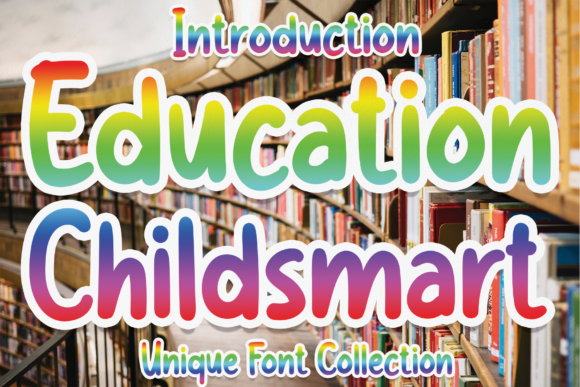
At its core, Education Childsmart mimics the look of fresh paint on a brush stroke. The letters are rounded, slightly irregular, and full of character. Unlike rigid sans-serif fonts that scream "corporate," or elaborate script fonts that can be hard to read at a glance, Education Childsmart sits in a sweet spot. It looks like something created by a child or an enthusiastic artist, yet it remains legible enough for headlines and key messages.
The "jolly" aspect of this font comes from its natural bounce. When you see words set in this typeface, they seem to dance. This is particularly effective when combined with bright colors like sunshine yellow, sky blue, or vibrant orange. The combination creates an immediate sense of fun and approachability. For creators who want their work to feel handmade and authentic rather than digitally sterile, this font provides the perfect texture.
Real-World Applications for Educators and Creators
Let's talk about where this actually works in practice. Imagine you are a kindergarten teacher preparing a weekly newsletter for parents. You could use a standard Arial font, but it would feel cold and administrative. Now, imagine using Education Childsmart for the header. Suddenly, the tone shifts. It signals to the parents that this is a place of joy and creativity. It sets the stage for the content inside, making the newsletter feel like a personal note rather than a formal report.
Similarly, consider the scenario of a blogger writing about parenting hacks or toy reviews. A blog post titled "5 Fun Ways to Teach Math" becomes infinitely more engaging when the title uses a font that reflects the subject matter. Education Childsmart allows you to maintain a professional blog structure while ensuring the headlines pop with personality. It helps break the monotony of long-form text, drawing the reader's eye exactly where you want it.
For entrepreneurs running a small business, such as a local bakery specializing in cupcakes or a boutique selling organic toys, this font is invaluable. Think about your packaging. A simple white box with black text says "product." That same box with a label featuring Education Childsmart in bold red or blue says "treat" or "gift." It elevates the perceived value of the item by associating it with care and attention to detail. Small business owners often struggle to stand out against big corporations; using a distinctive font like this helps establish a unique brand voice that feels friendly and trustworthy.
Digital Design and Marketing Strategies
In the digital space, attention spans are short. When scrolling through social media feeds, users stop only when something catches their eye. Education Childsmart acts as a visual hook. If you are designing Instagram stories or Facebook ads for a children's event, a summer camp, or a back-to-school sale, this font cuts through the noise. Its paint-brushed style adds a layer of texture that digital images often lack, making the graphic feel more tactile and inviting.
Marketers often advise against using too many fonts, but Education Childsmart has a specific role: it is best used as a display font for headlines, logos, and call-to-action buttons. Pairing it with a clean, simple body font (like a basic sans-serif) creates a beautiful contrast. The headline grabs attention with its whimsy, while the body text ensures the information is easy to digest. This balance is crucial for conversion rates. If a user finds the text difficult to read because it is too stylized, they will leave. But if the headline makes them smile and the body text delivers the message clearly, they stay.
Freelancers and graphic designers also benefit from having this tool in their arsenal. Clients often ask for designs that feel "fun" or "playful" but fear the result will look childish or amateurish. By introducing Education Childsmart, you can demonstrate an understanding of modern design trends that value authenticity over perfection. It shows you know how to use typography to evoke emotion, a skill that is highly valued in the creative industry.
When to Use (and When to Avoid) the Font
While Education Childsmart is versatile, it is not a one-size-fits-all solution. There are specific scenarios where it shines and others where it might undermine your message. Understanding these nuances is key to using it effectively.
- Perfect for: Birthday invitations, party banners, children's book covers, educational worksheets, toy packaging, summer camp flyers, and social media graphics for youth-oriented brands.
- Use with caution: Legal documents, financial reports, serious news articles, or any context where authority and gravity are required. Using a jolly, paint-brushed font for a contract or a medical warning label would be inappropriate and confusing.
- Best practices: Always ensure high contrast between the text and the background. Because the font has a textured, brush-like edge, it can sometimes get lost on busy or patterned backgrounds. Keep the background solid or subtly blurred to let the letters breathe.
Practical Considerations Before You Download
Before you start applying Education Childsmart to your next project, there are a few practical things to keep in mind. First, check the licensing terms. Many fonts available online come with restrictions on commercial use. If you plan to use this font on products you sell, such as t-shirts or mugs, ensure you have the correct commercial license to avoid legal issues later. Most reputable font foundries offer clear guidelines on what you can and cannot do.
Second, think about readability. While Education Childsmart is designed to be playful, it should never sacrifice clarity. Test your designs by viewing them at different sizes. Does the text remain readable on a mobile screen? Is it still clear when printed on a small sticker? Sometimes, a font that looks great on a large poster can become illegible when shrunk down. Always test your final output before publishing or printing.
Finally, consider the emotional impact on your specific audience. If you are targeting parents who are stressed and looking for quick solutions, a font that is too chaotic might add to their anxiety. However, if you are targeting children or celebrating a milestone, the jollier the better. Education Childsmart is a tool for setting a mood. Use it to create an atmosphere of learning, play, and happiness.
Making Every Project Shine
The difference between a good design and a great one often lies in the details. Education Childsmart is one of those details that can transform a generic project into something memorable. It bridges the gap between professional execution and human connection. Whether you are designing a classroom poster, a startup logo, or a holiday card, this font reminds us that design is not just about conveying information; it is about sharing feelings.
By integrating Education Childsmart thoughtfully, you acknowledge the importance of joy and creativity in everyday life. You show your audience that you care about their experience, not just the transaction. So, the next time you open your design software, don't settle for the default options. Give Education Childsmart a try, combine it with some bright colors, and watch how your projects come to life with a new sense of purpose and charm.