Sweet Dahlia: Integrating a Playful Display Font into Professional Workflows
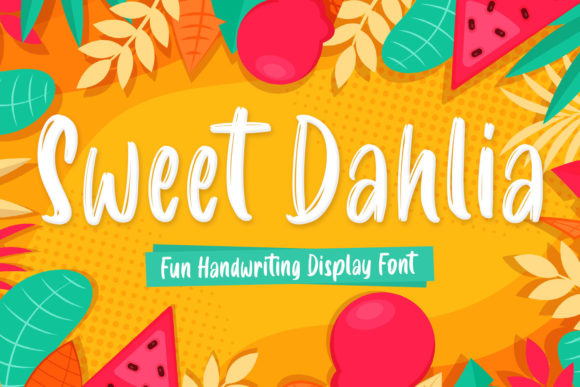
In the landscape of digital design and content creation, the choice of typography often dictates the tone before a single word is read. Sweet Dahlia stands out not merely as a typeface but as a strategic asset for professionals who need to balance playfulness with structure. Created with the help of a brush pen, this font captures the organic fluidity of hand-drawn strokes while maintaining the structural integrity required for modern display purposes. For entrepreneurs, marketers, and educators aged 20 to 50, understanding where Sweet Dahlia fits within a broader creative process is essential for maximizing its impact without compromising professional credibility.
The versatility of Sweet Dahlia allows it to serve as a top choice across a wide spectrum of creative ideas. Unlike rigid geometric sans-serifs or overly decorative scripts that can hinder readability, Sweet Dahlia offers a unique middle ground. It introduces warmth and personality into business workflows, making it ideal for branding initiatives, social media campaigns, and educational materials. When integrated correctly, it transforms standard documents into engaging experiences, guiding the user's eye and setting an emotional context for the content.
Strategic Placement in the Creative Process
To utilize Sweet Dahlia effectively, one must view typography as a functional component of project planning rather than just a final aesthetic touch. The integration of this font should occur at various stages of a project lifecycle, from initial brainstorming to final execution.
During the Planning Phase
Before a project officially launches, designers and strategists often create mood boards and style guides. In this stage, Sweet Dahlia can be used to define the "voice" of a campaign. If you are launching a new product line aimed at a younger demographic or a hobbyist community, incorporating Sweet Dahlia into your preliminary sketches helps visualize how the brand will feel. It acts as a filter for decision-making; if the playful nature of the font clashes with the core message, the team knows early on to pivot. This prevents costly revisions later in the production cycle.
During the Execution Phase
Once the concept is approved, the font moves into active use. For freelancers and small business owners, time is a currency. Sweet Dahlia speeds up the visual communication process because it requires less supporting imagery to convey a message. A headline set in Sweet Dahlia can stand alone on a flyer or email header, reducing the need for complex graphic overlays. This efficiency is crucial when managing tight deadlines or producing high volumes of content, such as daily blog posts or weekly newsletters.
Post-Project Analysis
After a campaign concludes, analyzing performance metrics often reveals which elements resonated most with the audience. Fonts like Sweet Dahlia can drive higher engagement rates in social media contexts due to their distinctive, human-like quality. Reviewing these outcomes helps refine future workflows. If data shows that headlines using Sweet Dahlia had a higher click-through rate than those using standard serif fonts, this insight becomes a permanent part of the organization's style guide.
Interfacing with Existing Tools and Platforms
Successful implementation depends heavily on compatibility with the tools already in use. Sweet Dahlia is designed to work seamlessly with major design platforms, including Adobe Creative Cloud, Canva, and Figma. However, the way it interacts with other assets determines the overall quality of the output.
When pairing Sweet Dahlia with body text, the choice of secondary typefaces is critical. Because Sweet Dahlia is a display font with strong character, it pairs best with clean, neutral sans-serifs or legible serifs. Using two display fonts together creates visual noise and reduces usability. For instance, combining Sweet Dahlia for headlines with a simple Open Sans or Roboto for body copy ensures that the playful energy of the title does not overwhelm the informational content. This hierarchy is vital for accessibility and long-term readability.
Furthermore, consider the file formats when integrating the font into web projects. Web fonts require specific loading strategies to maintain page speed. Since Sweet Dahlia features brush-stroke details, ensuring that the font files are optimized (e.g., using WOFF2 format) prevents layout shifts and maintains a smooth user experience. This technical consideration is often overlooked by non-technical creators but is fundamental for maintaining professional standards.
Practical Implementation Tips for Professionals
Integrating a new font into a workflow requires more than just selecting it from a dropdown menu. It demands a structured approach to ensure consistency and quality control. Here are practical strategies for embedding Sweet Dahlia into your daily routine.
- Establish Clear Usage Guidelines: Define exactly where Sweet Dahlia can be used. Is it restricted to headers? Can it be used for bullet points? Creating a simple internal document that outlines these rules prevents inconsistent application across different team members or over time.
- Test Across Devices: Before finalizing any deliverable, preview the font on mobile devices, tablets, and desktop screens. Brush pen fonts can sometimes render differently depending on the screen resolution or operating system. Ensuring the curves remain crisp and the weight remains balanced is a key step in quality assurance.
- Maintain Hierarchy: Do not let the font become the only focus. Use size, color, and spacing to support Sweet Dahlia. A common mistake is scaling the font too large or too small, which distorts the intended brush stroke effect. Stick to recommended sizes to preserve the artistic integrity of the letterforms.
- Leverage Color Psychology: The playful nature of Sweet Dahlia pairs exceptionally well with warm, vibrant colors, but it can also look sophisticated in monochrome. Experiment with color combinations during the prototyping phase to find the palette that best supports your specific goal, whether it is driving sales or encouraging learning.
Use Cases for Specific Audiences
The adaptability of Sweet Dahlia makes it suitable for a diverse range of users, each with unique requirements.
For Educators and Content Creators: In the realm of online learning, engagement is paramount. Sweet Dahlia can be used to highlight key concepts, quiz titles, or course module names. Its friendly appearance reduces the intimidation factor often associated with academic material, making learning environments feel more inviting and accessible.
For Marketers and Entrepreneurs: Small business owners often struggle to differentiate themselves from corporate giants. Sweet Dahlia offers a tool for personalization. It can be used in email subject lines to increase open rates, on packaging to signal artisanal quality, or on landing pages to capture attention immediately. The font signals that there is a real person behind the brand, fostering trust and connection.
For Freelancers and Designers: For those selling services, the portfolio itself is a product. Showcasing projects where Sweet Dahlia was used demonstrates a command of typographic nuance. It shows potential clients that the freelancer understands how to match the right tool to the right problem, moving beyond generic templates to custom solutions.
Long-Term Consistency and Brand Identity
One of the most significant challenges in creative work is maintaining consistency over time. As projects grow and teams expand, the risk of deviating from established styles increases. Sweet Dahlia, being a distinct and memorable typeface, can become a signature element of a brand identity if managed correctly.
To ensure long-term success, treat the font as a core component of your brand assets. Store the files in a centralized, accessible location so that all team members have access to the correct version. Regularly audit your existing materials to ensure they still align with current standards. If a project from six months ago used Sweet Dahlia in a way that no longer feels appropriate, update it to maintain a cohesive visual language.
Moreover, consider the longevity of the trend. While brush pen fonts have enjoyed a resurgence in popularity, they are now a staple in modern design. By adopting Sweet Dahlia early and integrating it thoughtfully into your workflows, you position yourself ahead of the curve. You are not just following a trend; you are building a sustainable visual strategy that can evolve alongside your business needs.
Final Thoughts on Workflow Integration
The journey of integrating Sweet Dahlia into your professional life is about more than aesthetics; it is about enhancing communication. By understanding its origins as a brush-pen creation and respecting its limitations and strengths, you can leverage its unique character to improve clarity, engagement, and brand perception. Whether you are drafting a proposal, designing a website, or creating a social media post, allowing Sweet Dahlia to lead the visual narrative can transform ordinary content into something memorable. With careful planning and consistent application, this versatile font will undoubtedly become a cornerstone of your creative toolkit.